Leaving the lake house every Sunday and forgetting to turn the thermostat down wastes real money by the time you're back at your primary residence. Set up away mode once on a smart thermostat and every future departure drops the furnace or AC into savings mode automatically, no dial-turning required.
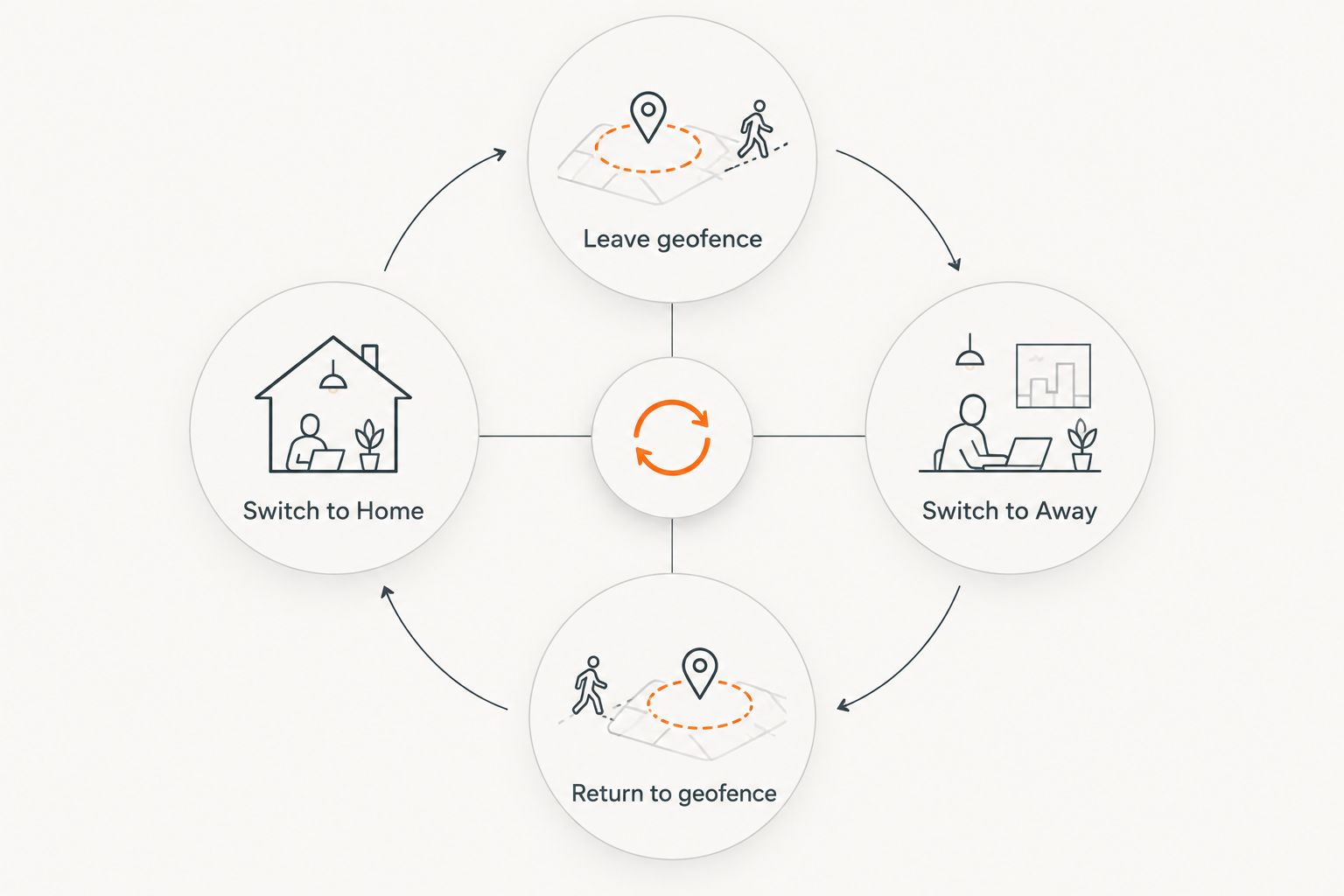
- Ecobee and Nest thermostats switch to away mode automatically once your phone crosses the geofence around the lake house.
- Geofencing beats a fixed weekly schedule at a Lake of the Ozarks second home because arrival days shift constantly.
- Most setups take about 15-20 minutes once the thermostat already has Wi-Fi and a common wire connected.
- A 55°F heat floor in away mode protects Missouri pipes from freezing; anything lower risks a burst line.
- For lake houses sitting empty on weekdays, geofenced smart thermostat away mode beats a programmed schedule every time.
Why this matters
Lake of the Ozarks properties sit empty most of the week for much of the year. Running a furnace at 70°F or an AC at 68°F in a house nobody's occupying burns fuel and electricity for nothing between visits to Camdenton, Osage Beach, and Lake Ozark.
A programmed weekly schedule doesn't fix this, because lake house arrivals don't follow a schedule — a Friday getaway one week, a random Wednesday the next. Geofenced away mode watches your phone instead of the calendar, so the thermostat reacts to when you actually leave, not when you told it you'd leave. In 2026, most Wi-Fi thermostats ship with this feature already built in — the gap is that almost nobody at a second home ever turns it on.
Missouri winters raise the stakes on getting this right: indoor pipes start freezing below roughly 55°F, so away mode has to hold a floor, not just shut the system off. That distinction is where most DIY setups go wrong in 2026, and it's the difference between a lower electric bill and a burst pipe over a cold weekend nobody's there to catch.
Before you start
- A Wi-Fi smart thermostat with geofencing (Ecobee, Nest, or a comparable model) wired to a common wire — most furnace and AC systems installed after the 1990s already have one, but older Lake of the Ozarks systems sometimes don't. If yours doesn't, a West Heating & Cooling technician can add one during a single visit.
- The thermostat's app installed on every phone that leaves the property regularly, with location permissions set to "Always," not "While Using." Away mode can't see your phone leave if the app can't run in the background.
- Wi-Fi and power that stay on when you leave. This is the gotcha that breaks more away-mode setups than anything else: if you cut power to save on the electric bill while you're gone, the router goes dark with it, and the thermostat loses its connection the moment the house is empty. Away mode never fires because the thermostat never hears you left.
Set up your thermostat's Wi-Fi connection
Away mode is useless if the thermostat drops offline the second nobody's home to reboot the router.
- Open the thermostat's app and go to Settings > Wi-Fi.
- Select the lake house network and enter the password.
- Confirm the thermostat's screen shows a solid Wi-Fi icon, not a blinking one.
- In the app, check the device status reads "Online" or "Connected."
If the thermostat isn't wired in yet, walk through the Ecobee thermostat connection guide or the Nest thermostat connection guide first — both cover what to do when an older furnace doesn't have a common wire, which shows up often in lake houses built before 2000. West Heating & Cooling wires these to code on every install across the Lake of the Ozarks region.
Expected result: the app shows the thermostat as connected and reachable from outside the property — test this by checking the app on cellular data before you leave the driveway.
Configure geofencing for away mode
- In the app, open Settings > Home & Away (Nest calls this Home/Away Assist; Ecobee calls it Smart Home/Away).
- Toggle the feature on.
- Set the geofence radius — Ecobee defaults to roughly 8-10 miles, Nest lets you adjust the radius manually.
- Add every phone that regularly comes and goes from the property under Household Members.
- Save.
Expected result: the app's status changes from "Home" to "Away" within a few minutes of the last registered phone crossing the radius — check this by opening the app once you're on the highway leaving town.
Route the same trigger into a bigger routine — locking the smart lock, turning off lights, dropping the water heater temperature — by connecting your HVAC system to Google Home so one departure kicks off the whole house instead of just the thermostat.
Set your away-mode temperature range
- In the app, open the Away settings (separate from the regular schedule tab).
- Set the heat-to temperature. Don't go below 55°F in a Missouri lake house in winter — pipes start freezing below that line even in an insulated crawlspace.
- Set the cool-to temperature. 82-85°F is standard for keeping summer humidity from building up in an empty house without running the AC full time.
- Save and confirm the app shows the new away setpoints under the Home & Away tab.
Expected result: the next time the geofence trips, the thermostat holds the away setpoint instead of the regular schedule — the mode change logs in the app's history tab, so you can confirm it worked without being there.
Run away mode on a fixed schedule instead
Geofencing needs a phone that leaves with the house. That doesn't work for a rental property where the owner isn't the one coming and going — guests are.
For Airbnb and short-term rental setups, skip geofencing and program a fixed away schedule instead: away mode kicks in a set number of hours after the listed checkout time and switches back to Home mode an hour before the next check-in. It's less precise than geofencing but doesn't depend on a guest's phone joining the network. Property managers running several units around the lake usually pair this with a broader maintenance routine — details on structuring that live in the guide to HVAC maintenance for Airbnb and short-term rental hosts.
Get your lake house away-mode ready
West Heating & Cooling wires and configures smart thermostats across the Lake of the Ozarks.
Troubleshooting
- Away mode never triggers. Check the phone's battery saver settings — aggressive power-saving modes kill background location tracking, so the thermostat never sees the phone leave. Turn off battery optimization for the thermostat app specifically.
- Thermostat shows "offline" when you get back. The router likely lost power during a storm while the house sat empty — common at the lake during spring and fall weather in 2026 as much as any other year. Plug the router into a dedicated outlet that never gets shut off with the rest of the house.
- The house is too cold or too humid on arrival. The away setpoints are too aggressive for the return trip. Loosen the range by a couple degrees so the system doesn't need hours to recover before you're comfortable.
- Away mode won't turn on with two people's phones registered. Most systems require every registered phone to leave before switching to Away — if a phone is left behind, charging in a drawer, the house reads as occupied indefinitely.
- The furnace runs nonstop in away mode during a cold snap. A 55°F floor still calls for heat constantly when it's below zero outside — that's the system working correctly, not a fault.
Customize your workflow
Away mode is one piece of running HVAC at a property that sits empty most of the week. Pair it with a freeze alarm on the thermostat, a maintenance plan that catches problems before a season change, and a system sized for a house that cycles between empty and full rather than steady daily use. West Heating & Cooling, a family-owned HVAC contractor serving Camdenton, Osage Beach, Lake Ozark, Warsaw, and Lebanon, handles both the thermostat wiring and the full HVAC system behind it, and most away-mode setups on an existing wired thermostat take a single visit if the wiring needs an update in 2026.
FAQ
What is smart thermostat away mode for a lake house?
Away mode is a thermostat setting that automatically raises the cooling setpoint or lowers the heating setpoint once your phone leaves a set radius around the property. At a lake house it removes the need to remember adjusting the thermostat every time you head back to your primary residence.
Is geofencing better than a schedule for a lake house thermostat?
Yes, for owner-occupied lake houses. A fixed schedule assumes you leave the same day every week, which rarely holds for a second home, while geofencing reacts to when your phone actually leaves.
How cold can I set away mode in winter without freezing pipes?
Keep the away heat setpoint at 55°F or higher in a Missouri lake house. Indoor temperatures below that start putting exposed and poorly insulated pipes at risk of freezing.
Does Ecobee or Nest work better for a lake house away mode?
Both support geofencing reliably. Ecobee adds a built-in room sensor that can catch a cold room even with the main sensor reading warm, which matters in larger lake houses with uneven heating.
Why does my thermostat show offline when I get back to the lake house?
The most common cause is the router losing power while the house sat empty, often after a storm. Keeping the router on a dedicated outlet that stays powered fixes this in most cases.
Can a rental property use away mode without the guest's phone?
Yes. Instead of geofencing, set away mode on a fixed schedule tied to checkout and check-in times so it doesn't depend on a guest's phone joining the network.
Does a smart thermostat need a common wire for away mode?
Most Wi-Fi smart thermostats need a common wire to stay powered and connected around the clock. Furnaces installed before the 1990s sometimes lack one and need a quick wiring update first.
One last thing
The failure that shows up most in service calls isn't a bad thermostat setting — it's a router that lost power while the house sat empty and never reconnected, so away mode fires correctly but nobody finds out until the pipes are already cold. Put the router on the same circuit as the thermostat, not on a switch that gets cut with everything else when you leave for the season.